Collections Overview
The Kotlin Standard Library provides a comprehensive set of tools for managing collections.
A collection usually contains a number of objects of the same type (and its subtypes). Objects in a collection are called elements or items.
The following collection types are relevant for Kotlin:
List
Set
Map
Collection types
The Kotlin Standard Library provides implementations for basic collection types: sets, lists, and maps.
A pair of interfaces represent each collection type:
A read-only interface that provides operations for accessing collection elements.
A mutable interface that extends the corresponding read-only interface with write operations: adding, removing, and updating its elements.
Note that a mutable collection doesn't have to be assigned to a var. Write operations with a mutable collection are still possible even if it is assigned to a val.
The benefit of assigning mutable collections to val is that you protect the reference to the mutable collection from modification. Over time, as your code grows and becomes more complex, it becomes even more important to prevent unintentional modification to references.
The read-only collection types are covariant. This means that, if a Rectangle class inherits from Shape, you can use a List<Rectangle> anywhere the List<Shape> is required. In other words, the collection types have the same subtyping relationship as the element types.
Maps are covariant on the value type, but not on the key type.
In turn, mutable collections aren't covariant; otherwise, this would lead to runtime failures. If MutableList<Rectangle> was a subtype of MutableList<Shape>, you could insert other Shape inheritors (for example, Circle) into it, thus violating its Rectangle type argument.
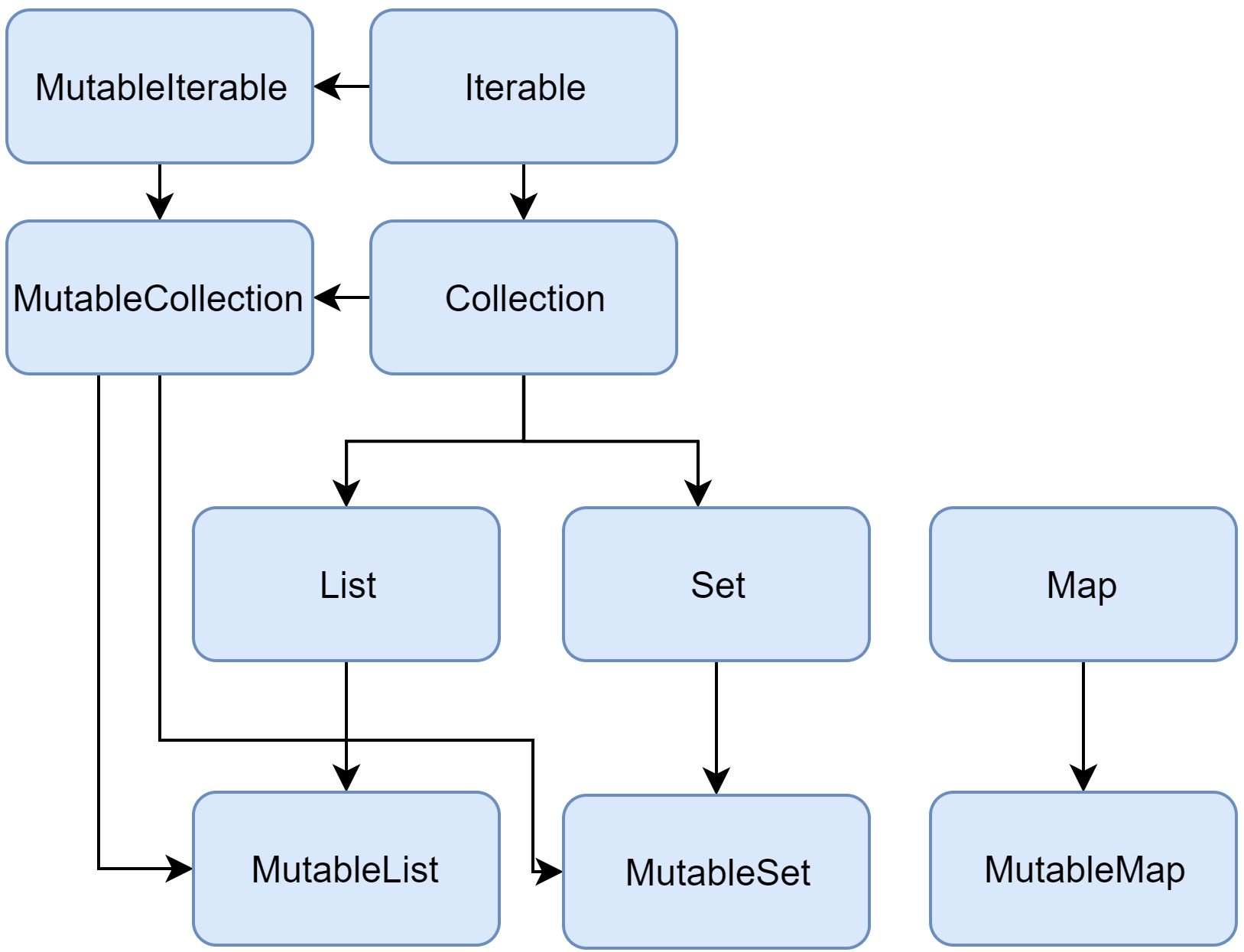
Below is a diagram of the Kotlin collection interfaces:
Collection
Collection<T>is the root of the collection hierarchy. This interface represents the common behavior of a read-only collection: retrieving size, checking item membership, and so on.
Collection inherits from the Iterable<T> interface that defines the operations for iterating elements.
You can use Collection as a parameter of a function that applies to different collection types. For more specific cases, use the Collection's inheritors: List and Set.
MutableCollection<T> is a Collection with write operations, such as add and remove.
List
List<T> stores elements in a specified order and provides indexed access to them. Indices start from zero – the index of the first element – and go to lastIndex which is the (list.size - 1).
List elements (including nulls) can duplicate: a list can contain any number of equal objects or occurrences of a single object.
Two lists are considered equal if they have the same sizes and structurally equal elements at the same positions.
MutableList<T> is a List with list-specific write operations, for example, to add or remove an element at a specific position.
As you see, in some aspects lists are very similar to arrays.
However, there is one important difference: an array's size is defined upon initialization and is never changed; in turn, a list doesn't have a predefined size; a list's size can be changed as a result of write operations: adding, updating, or removing elements.
Set
Set<T> stores unique elements; their order is generally undefined. null elements are unique as well: a Set can contain only one null.
Two sets are equal if they have the same size, and for each element of a set there is an equal element in the other set.
MutableSet is a Set with write operations from MutableCollection.
The default implementation of MutableSet - LinkedHashSet – preserves the order of elements insertion. Hence, the functions that rely on the order, such as first() or last(), return predictable results on such sets.
An alternative implementation – HashSet – says nothing about the elements order, so calling such functions on it returns unpredictable results. However, HashSet requires less memory to store the same number of elements.
Map
Map<K, V>is not an inheritor of the Collection interface; however, it's a Kotlin collection type as well.
A Map stores key-value pairs (or entries); keys are unique, but different keys can be paired with equal values.
The Map interface provides specific functions, such as access to value by key, searching keys and values, and so on.
Two maps containing the equal pairs are equal regardless of the pair order.
MutableMap is a Map with map write operations, for example, you can add a new key-value pair or update the value associated with the given key.
The default implementation of MutableMap – LinkedHashMap – preserves the order of elements insertion when iterating the map. In turn, an alternative implementation – HashMap – says nothing about the elements order.
ArrayDeque
ArrayDeque<T> is an implementation of a double-ended queue, which allows you to add or remove elements both at the beginning or end of the queue.
As such, ArrayDeque also fills the role of both a Stack and Queue data structure in Kotlin. Behind the scenes, ArrayDeque is realized using a resizable array that automatically adjusts in size when required: