WorkManager
WorkManager is the recommended solution for persistent work.
Work is persistent when it remains scheduled through app restarts and system reboots.
Because most background processing is best accomplished through persistent work, WorkManager is the primary recommended API for background processing.
Types of persistent work
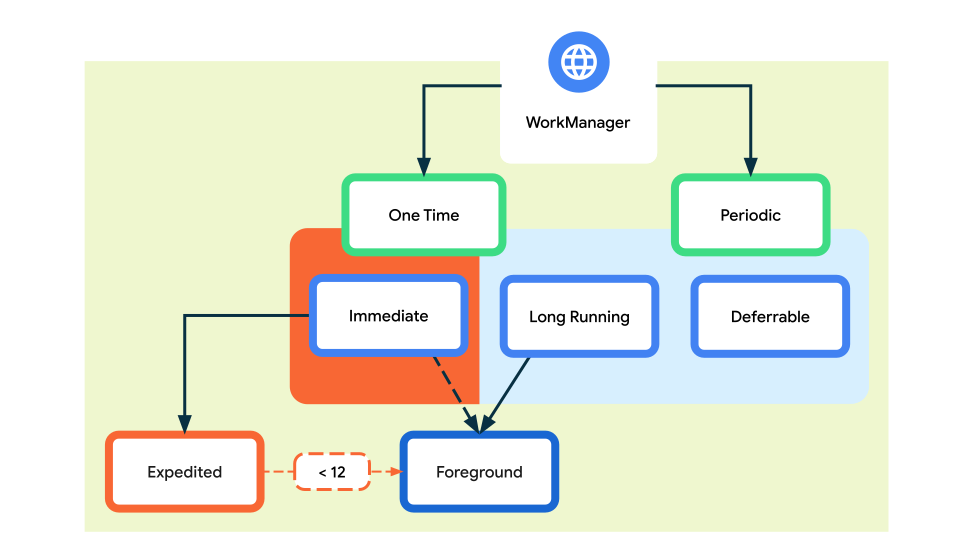
Two main types:
OneTimeWork | PeriodicWork |
|---|---|
Run Once | Runs Repeatedly |
Retry if fails | Minimum interval: 15 mins |
Not exact timing |
WorkManager handles three types of persistent work:
Immediate: Tasks that must begin immediately and complete soon. May be expedited.
Long Running: Tasks which might run for longer, potentially longer than 10 minutes.
Deferrable: Scheduled tasks that start at a later time and can run periodically.
Expedited work
High-priority WorkManager task
Tries to run as soon as possible
Bypasses most background delays
Still battery-aware
What expedited work is NOT
Not guaranteed instant
Not for long-running tasks
Not allowed unlimited times
Deferrable work
The task does not need to run at an exact time
It must eventually run
The system is allowed to delay, batch, or reschedule it
Survival across:
app process death
device reboot
Examples:
Sync data with server
Upload logs
Clean cache
Periodic analytics
Retry failed network calls
Why WorkManager exists
Because developers:
abused AlarmManager
abused Services
ignored battery
WorkManager was created to:
abstract OS versions
respect power restrictions
give predictable behavior
Core ideas
1. Actual work lives in a Worker
You subclass:
Workeror
CoroutineWorkeror
RxWorker(yes, still alive somehow)
Inside
doWork()you:do background work
return:
Result.success()Result.retry()Result.failure()
No threads. No handlers.
2. Constraints (this is the magic)
Examples:
Network must be available
Device must be charging
Battery not low
Storage not low
Work runs only when constraints are satisfied.
If constraints break mid-way, work can stop and retry later.
3. Guaranteed execution
WorkManager:
Persists work in a database
Reschedules after:
app kill
process death
device reboot
Behind the scenes it uses:
JobScheduler (modern Android)
AlarmManager + BroadcastReceiver (ancient Android)
Chaining work
You can define dependencies:
Step A → Step B → Step C
Conditional execution
Parallel + sequential flows
Example: Upload file → update DB → notify server
No manual state tracking. No flags.
Foreground work
If work is:
long-running
user-visible
important
WorkManager can promote it to a foreground service with a notification.
Unique work
WorkManager can enforce uniqueness:
Only one sync job at a time
Replace existing work
Keep old work
This prevents:
duplicate uploads
infinite retries
accidental DoS on your own backend
Use WorkManager for reliable work
WorkManager is intended for work that is required to run reliably even if the user navigates off a screen, the app exits, or the device restarts. For example:
Sending logs or analytics to backend services.
Periodically syncing application data with a server.
WorkManager is NOT intended for in-process background work that can safely be terminated if the app process goes away.
It is also NOT a general solution for all work that requires immediate execution.
AlarmManager vs WorkManager
Need | Use |
|---|---|
Exact time | AlarmManager |
Eventually | WorkManager |
Battery-friendly | WorkManager |
Survives reboot | WorkManager |
Example
Define MyWorker class that extends Worker class and overridedoWork() method.
In MainActivity.java, Initial setup :
Enqueue the one time work request :
Enqueue the periodic work request :
Cancel the work request :
Chaining Multiple Work :