Activities
An Activity:
Represents one UI screen
Handles user interaction
Acts as the entry point for user-facing features
An Activity is an Android component that provides a screen with which users can interact to perform a specific task.
Activity Lifecycle
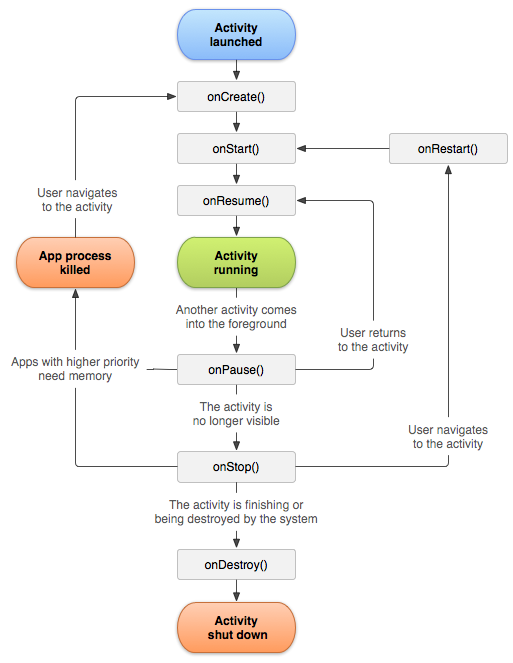
The Activity class provides the following callbacks that you can override to perform actions when the corresponding event occurs:
onCreate():
Called when the activity is first created,
it initializes the essential components of your activity,
For example, it Inflates layout of the Activity.
onStart():
Activity becomes visible to the user.
UI is on screen but not interactive yet.
onResume():
The system invokes this callback just before the activity starts interacting with the user.
The activity is at the top of the activity stack.
Captures all user input / Interacts with the user.
onPause():
Called when the activity loses focus.
Though Activity is still partially visible.
For example, A runtime permission dialog appears.
onStop():
Called when the activity is no longer visible to the user.
Used to Stop heavy operations, Unregister receivers, Release resources we don’t need while hidden.
onRestart():
Called when an activity in the Stopped state, and is about to restart.
Restores the state of the activity from the time that it was stopped.
onDestroy():
Called before an activity is destroyed.
Not guaranteed to be called. (E.g. When app is killed)
Back stack behaviour
Back Stack: Activities are arranged with the order in which each activity is opened. This maintained stack called Back Stack.
New Activity → pushed on stack
Back button → popped off stack
Home button → stack preserved
1. Dialog Overlapping
App Started :
onCreate(), onStart(), onResume()
Dialog Appeared :
onPause()
Closing the dialog :
onResume()
2. User Navigates Away
App Started :
onCreate(), onStart(), onResume()
Home Button Pressed :
onPause()
onStop()
onSaveInstanceState()
App Restarted :
onRestart()
onStart()
onResume()
3. Configuration Changes
App Started :
onCreate(), onStart(), onResume()
Device Rotated :
onPause()
onStop()
onSaveInstanceState()
onDestroy()
onCreate()
onStart()
onRestoreInstanceState()
onResume()
4. Call finish() in onCreate()
onCreate()
onDestroy()
5. Navigating between Activities
App Started (Activity A):
onCreate(): A, onStart(): A, onResume(): A
Navigating to B :
onPause(): A
onCreate(): B
onStart(): B
onResume(): B
onStop(): A
Navigating back to A :
onPaused(): B
onRestart(): A
onStart(): A
onResume(): A
onStop(): B
onDestroy(): B
6. Configuration changes when activities in backstack
App Started (Activity A):
onCreate(): A, onStart(): A, onResume(): A
Navigating to B :
onPause(): A
onCreate(): B
onStart(): B
onResume(): B
onStop(): A
Device Rotated :
onPause(): B
onStop(): B
onDestroy(): B
onCreate(): B
onStart(): B
onResume(): B
Navigating back to A : (With Rotated Device)
onPause(): B
onDestory(): A
onCreate(): A
onStart(): A
onResume(): A
onStop(): B
onDestroy(): B
Task
A task represents a sequence of activities that have a specific workflow or are related to a specific user action.
When activities belong to the same task, they are part of the same workflow and share the same task stack.
When activities belong to different tasks, they are independent of each other and have their own task stacks.
Activities in different tasks cannot influence each other's behavior directly.
Activity D in App 2 is in a different task.
Even though Activity D might be in the foreground, pressing the back button would bring the user back to the task stack in App 1.
Activity Launch Modes
1. Standard
The default and most common launch mode.
Every time there's a new intent, a new instance of the activity will be created and placed on the top of the stack.
Stack:
Launch B
2. SingleTop
If the Activity is already at the top, reuse it.
Otherwise, create a new instance.
Calls onNewIntent() instead of onCreate() when reused.
Stack:
Start B again:
Start A again:
Key callback used:
singleTop does not guarantee single instance. It guarantees only top-level activity reuse.
3. SingleTask
Only one instance per task.
If instance exists:
All Activities above it are destroyed
That instance moves to top
onNewIntent()is called
Stack:
Start B:
This launch mode rewrites the back stack.
4. SingleInstance
Activity gets its own task (Any other activity started from this activity will be created in a new task.)
No other Activities can exist in that task
Only one instance system-wide
Stack:
Launch D (singleInstance)
Launch E (from D)
Summary
A task is a stack of Activities.
Launch modes decide:
Which task is used
Whether an instance is reused
How the stack is rearranged