MVVM
1. Model
What it is
Business logic
Data layer
Rules of the app
In Android terms
Repositories
Data sources (Room, Retrofit, DataStore)
Domain models
Use cases (if you’re being disciplined)
What it must NOT know
Activities
Fragments
Views
2. View
What it is
UI only
Displays data
Sends user actions upward
Android examples
Activity
Fragment
Jetpack Compose UI
XML layouts
Responsibilities
Observe state
Render UI
Forward user events
What it must NOT do
Business logic
Network calls
Database operations
Decision making beyond basic UI stuff
3. ViewModel
What it is
Holds UI-related state
Handles user actions
Talks to Model
Survives configuration changes
Key idea: ViewModel does NOT know the View exists.
No references to Activity, Fragment, Context (unless Application is explicitly justified).
Android ViewModel responsibilities
Expose state via LiveData, StateFlow, or Compose State
Process events from View
Call repositories / use cases
Transform data into UI-friendly form
Data flow
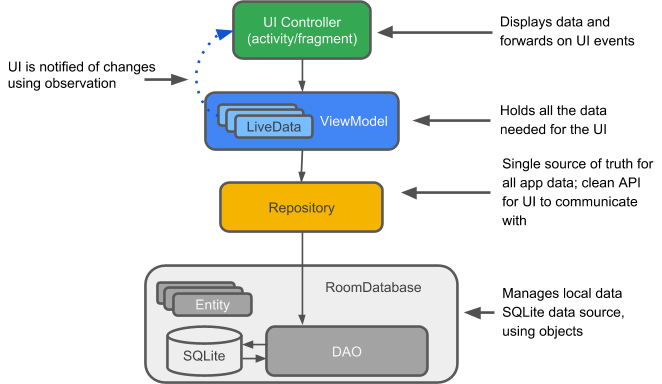
User interacts with View
View calls a method on ViewModel
ViewModel updates state
View observes state change
UI re-renders
LiveData
LiveData is an observable data holder class.
Unlike a regular observable, LiveData is lifecycle-aware, meaning it respects the lifecycle of other app components, such as activities, fragments, or services.
This awareness ensures LiveData only updates app component observers that are in an active lifecycle state.
Follow these steps to work with LiveData objects:
Create an instance of
LiveDatato hold a certain type of data. This is usually done within your ViewModel class.Create an Observer object that defines the
onChanged()method, which controls what happens when the LiveData object's held data changes. You usually create an Observer object in a UI controller, such as an activity or fragment.Attach the Observer object to the LiveData object using the
observe()method. Theobserve()method takes a LifecycleOwner object. This subscribes the Observer object to the LiveData object so that it is notified of changes.
Using LiveData objects
A LiveData object is usually stored within a ViewModel object and is accessed via a getter method.
LiveData delivers updates only when data changes, and only to active observers.
Why MVVM works well on Android
Configuration changes
ViewModel survives rotation
Lifecycle awareness
LiveData / Flow respect lifecycle
Fewer memory leaks
Testability
ViewModel can be unit tested without Android framework
Jetpack support