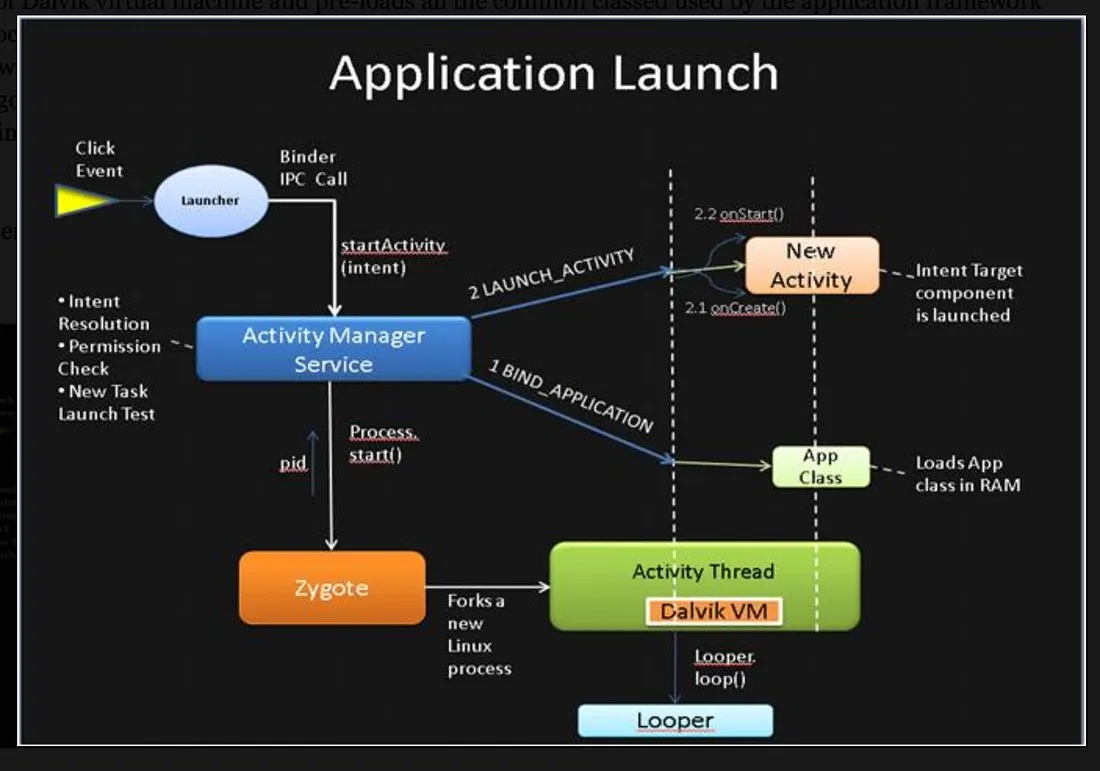
Application Launch Process
1. User clicks app icon
User taps the icon in the launcher (for example Launcher3).
The icon click event gets translated into startActivity(intent) and it is routed to ActivityManagerService via Binder IPC.
2. ActivityManagerService Checks Process
Is the app process already running?
If yes → reuse the process
If not → create a new process
Now the system needs a Linux process.
But Android does something clever here.
Instead of calling fork() directly from system_server, it asks Zygote.
3. AMS Requests Zygote to Fork
ActivityManagerService sends a command to Zygote via Zygote socket.
4. Zygote forks the process
Now two processes exist:
Parent → Zygote
Child → New App Process
The child process then runs:
5. ActivityThread starts
Inside the new app process:
does:
Prepare main thread
Create ActivityThread instance
Register with AMS
7. System Server Sends bindApplication()
Now ActivityManagerService sends a message to the app process:
This call contains:
ApplicationInfo
Loaded APK path
Target SDK
Instrumentation info
This is received in:
8. Application Object Creation
Inside handleBindApplication():
Android creates the Application instance.
Steps:
Create LoadedApk
Setup ClassLoader
Load app classes
Create Application object
Application app = mInstrumentation.newApplication(...)
This method invokes makeApplication() method which loads app specific classes into memory.
9. Launch Activity
Now AMS instructs the app to start the Activity.
Binder message:
Received in:
Steps:
Create Activity instance
Attach context
Call lifecycle
onCreate() onStart() onResume()
Finally the Activity becomes visible.
What is ActivityThread
ActivityThread is not a thread. It’s just a Java class that runs on the main thread of your app process.
The real thread is the main/UI thread, created when your app process starts.
Inside that thread:
Android calls
ActivityThread.main()That sets up a
LooperThen starts processing messages (like launching activities, services, etc.)
So:
What does ActivityThread do?
Think of it as the central controller of your app process:
Launches Activities
Handles lifecycle callbacks
Talks to
system_servervia Binder (AMS, etc.)Dispatches events using a Handler
Summary