Android Boot Process
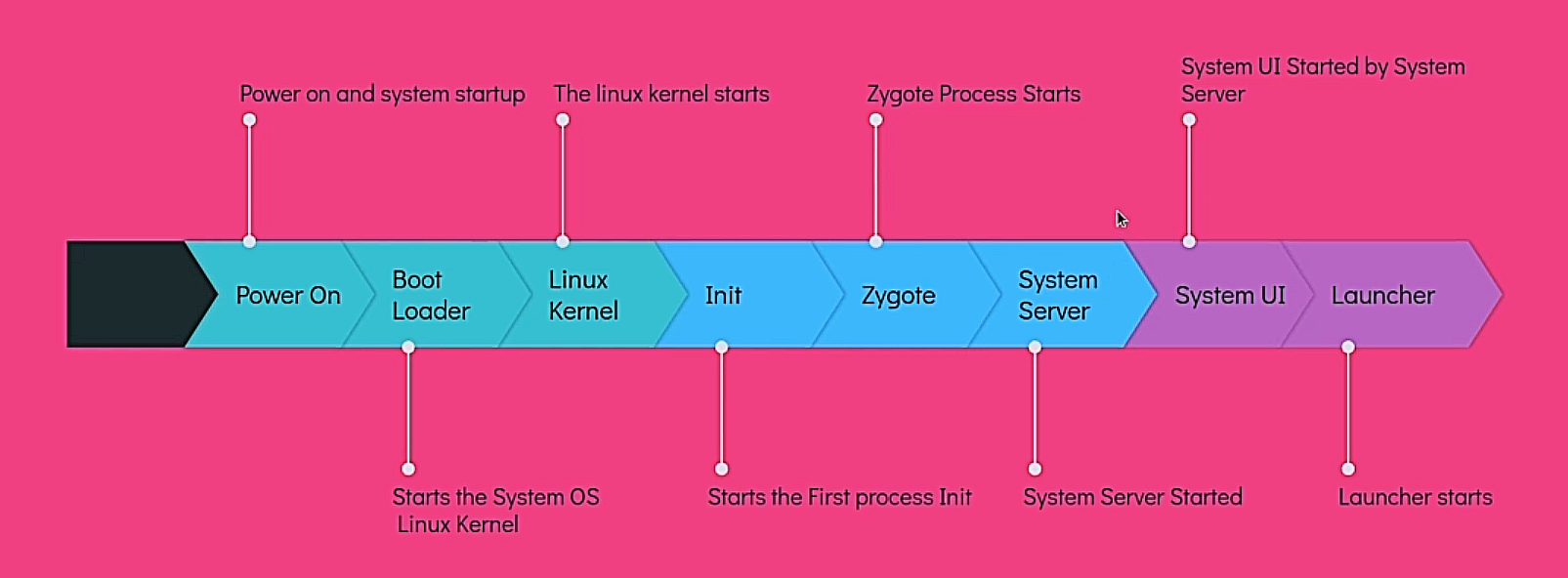
Power On
The Android boot process begins when the user presses the power buttonto turn on the device.
The power management unit (PMU) initializes, supplying power to the device's hardware components.
Bootloader
The bootloader is a piece of software that runs before the Android operating system starts up.
It is stored in a dedicated, read-only memory section.
It conducts basic hardware checks.
Then bootloader proceeds to load the kernel into memory (System OS).
Kernel
Initializes:
Process scheduler
Memory management
Drivers (display, camera, USB, etc.)
Mounts root filesystem (ramdisk)
Init Process
Responsibilities:
Mount partitions:
/system,/vendor,/dataParse
.rcscripts
Set up SELinux policies
Initialize the start Property Service (Initializes the properties within the system)
Parse the
init.rcconfiguration file and start Zygote process
Zygote
Zygote is a parent process that creates and manages all the application processes.
It starts a Dalvik/ART VM.
It will call runSelectLoop() method, which will wait for the request from the ActivityManagerService.
It creates App Process and System Server by fork mechanism.
fork() uses copy-on-write, meaning new apps share the same memory pages. This makes app startup much faster and lighter.
System Server
System Server is a parent process that creates and manages all the system services.
It calls three methods:
startBootstrapServices()startCoreServices()startOtherServices()
Services started by
startBootstrapServices()method are:Installer
ActivityManagerService
PowerManagerService
LightsService
DisplayManagerService
SensorService
PackageManagerService
Services started by
startCoreServices()method are:BatteryService
UsageStatsService
GpuService
WebViewUpdateService
Services started by
startOtherServices()method are:CameraService
AlarmManagerService
InputManagerService
WindowManagerService
BluetoothService
NotificationManagerService
LocationManagerService
AudioService
System UI initialization
It initializes the System UI components.
System UI refers to any element displayed on the screen that is not part of an app.
Status bar
Navigation bar
Recent apps screen
PowerUI
VolumeUI
PipUI (Picture-in-Picture)
Stack Divider (Split Screen)